
How can I distribute Digital Business Cards created in bulk to employees?
You can email each employee the unique link to their Digital Business Card directly from the QRCodeChimp dashboard.
- Go to Dashboard > Bulk QR Codes.
-
Locate your Digital Business Cards bulk, open the options menu, and select Share QR Code Link via Email.
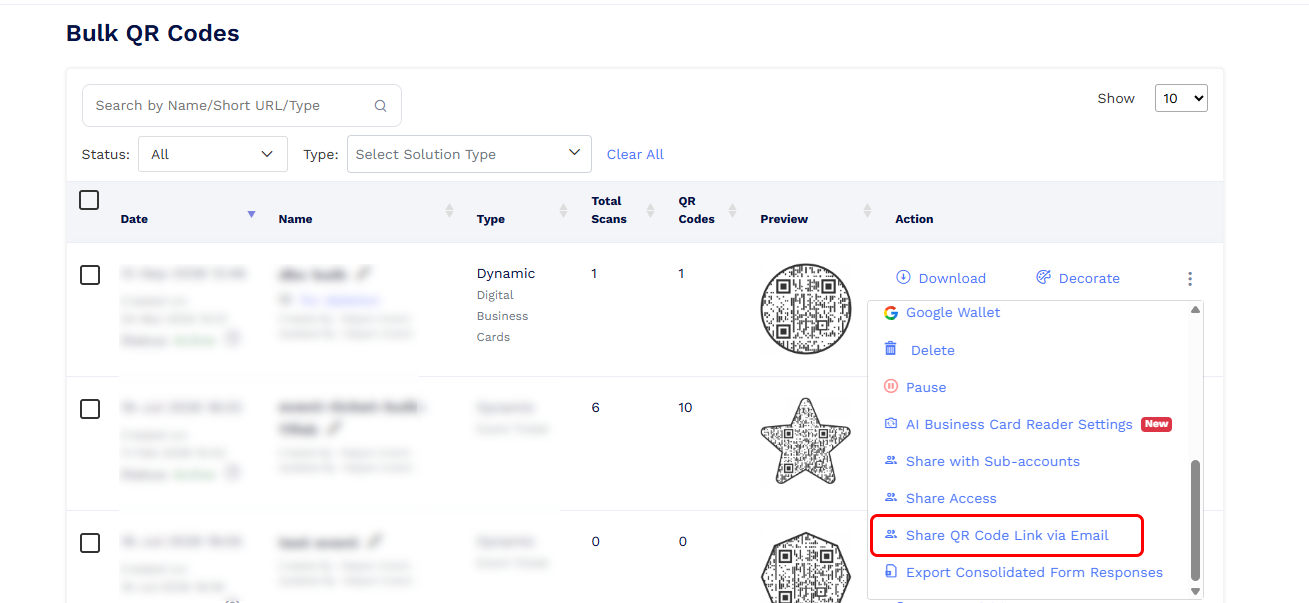
- You can choose one of the following email sources:
- Primary email in the card profile: This is the email address added in the Contact Us section of the Digital Business Card. If multiple email addresses are added, the first email address is treated as the primary email.
-
Email for Sharing QR Code Link: QRCodeChimp will use the email address entered in the Email for Sharing QR Code Link column of your uploaded Excel file.
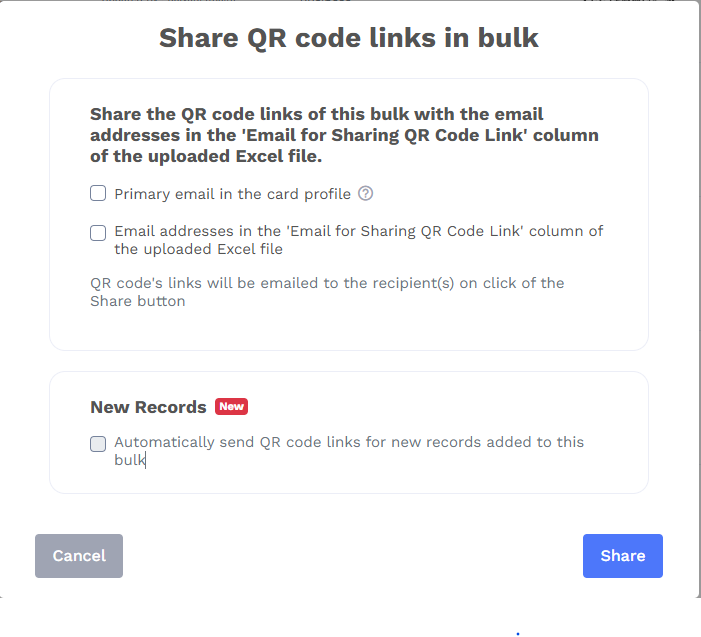
- Select the required option and click Share. Each employee will receive the unique link to their own Digital Business Card.
You can also enable Automatically send QR code links for new records added to this bulk. When enabled, QRCodeChimp will automatically email the card link whenever a new record is added to the bulk.