
How can I make one QR code open different links based on the user’s country or region?
You can use the Country / Region condition in Smart QR Code to direct users to different destinations based on their detected location.
For example, one QR code can open your US website for users in the United States and your Canadian website for users in Canada.
Set up country- or region-based destinations
- Open the Smart QR Code generator to create a new QR code, or open an existing Smart QR Code for editing from your dashboard.
- Under the relevant scan destination, enter the destination details or select a saved QR code.
- Click + Add Smart Rule, or Edit Smart Rule if a rule already exists.
- Select Country / Region under Condition.
- Under Match, choose the appropriate option and select the corresponding countries or regions. For example, 'Country is' matches the selected countries, while 'Country is not' excludes them.
-
Enable Use precise location if you want to request the user’s precise location for matching.
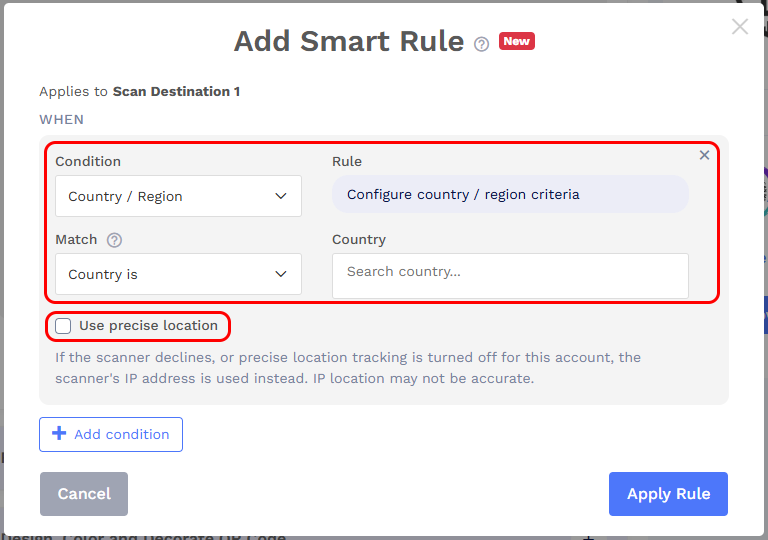
- Click Apply Rule. Add other destinations and their rules as needed, then save your Smart QR Code.
How location is determined
By default, this condition uses the scanner’s IP address to estimate their location.
If Use precise location is enabled, precise location is requested. If the user declines permission or precise location tracking is turned off for the account, IP-based location is used instead.
Note: IP-based location is approximate and may differ from the user’s actual location. Set a fallback destination for scans that do not match any destination’s rules.