
How do I create a static QR code?
QRCodeChimp lets you create static QR codes for selected QR code solutions.
Create a static QR code
- Go to the QRCodeChimp Solutions and select the solution you want to use.
- Enter the required information.
-
If the selected solution supports both static and dynamic QR codes, keep the Make dynamic option turned off.
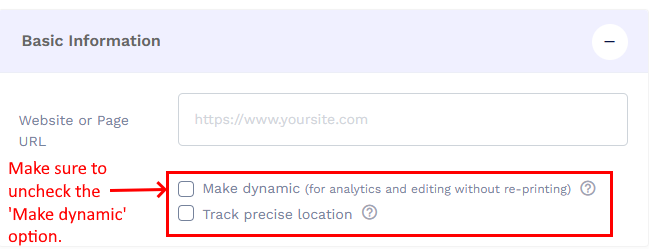
Uncheck Make Dynamic, if avlailable. - Customize the QR code design as needed.
- Click Save QR Code, give your QR code a name, and save it.
- Download the QR code in your preferred format.
Static-only QR code solutions
These solutions create static QR codes only.
| Solution | Link |
|---|---|
| Text | Text QR Code Generator |
| WiFi | WiFi QR Code Generator |
| UPI | UPI QR Code Generator |
Solutions that support both static and dynamic QR codes
For these solutions, keep the Make dynamic option turned off to create a static QR code.
| Solution | Link |
|---|---|
| YouTube | YouTube QR Code Generator |
| Google Review | Google Review QR Code Generator |
| Google Calendar | Google Calendar QR Code Generator |
| Google Meet | Google Meet QR Code Generator |
| Zoom Meeting | Zoom Meeting QR Code Generator |
| Resume | Resume QR Code Generator |
| Calendar | Calendar QR Code Generator |
| Google Forms | Google Forms QR Code Generator |
| Google Maps | Google Maps QR Code Generator |
| Google QR Code Generator | |
| Meeting | Meeting QR Code Generator |
| URL | URL QR Code Generator |
| PDF to QR Code | PDF to QR Code Generator |
| Presentation | Presentation QR Code Generator |
| Video Preview | Video Preview QR Code Generator |
| vCard | vCard QR Code Generator |
| Payments | Payments QR Code Generator |
| WhatsApp QR Code Generator | |
| Email QR Code Generator | |
| SMS | SMS QR Code Generator |
All remaining QRCodeChimp solutions are dynamic-only and cannot be created as static QR codes.
Important points about static QR codes
A static QR code stores the information directly in the QR code. Once created, its encoded content cannot be changed.
Static QR codes also do not provide scan analytics. If you want to update the destination later or track scans, create a dynamic QR code instead.
Editing or converting a static QR code
A static QR code cannot be edited or converted into a dynamic QR code after it has been created. If the information changes, you will need to create a new QR code.